
Screenshots


App details
- Version
- 2.0
- Size
- 1.17 MB
- Updated
- November 7, 2012
- Requires
- Windows Vista
- Language
- English
- License
- Free
- Developer
- Raymond.CC
- Category
- Windows OS
SoftPas in:
This product is also available in the following languages:
About Ray
Download X-Ray – Free Security Tool for Malware Analysis & VirusTotal Scanning
X-Ray is a powerful, free, and portable security utility designed for users who want to proactively protect their systems from emerging malware threats. This lightweight software enables you to submit suspicious files to over 30 antivirus engines simultaneously through VirusTotal, delivering instant, comprehensive scan results. With automatic updates and no installation required, X-Ray is ideal for both casual users and IT professionals. Its intuitive interface allows you to analyze files with just a few clicks, making it a must-have tool for anyone serious about cybersecurity. By submitting unknown files, you also contribute to global threat intelligence, helping security researchers stay ahead of new viruses. Whether you're on Windows, Mac, or using a portable setup, X-Ray ensures your system remains secure and your digital footprint safer.
Key Features of X-Ray
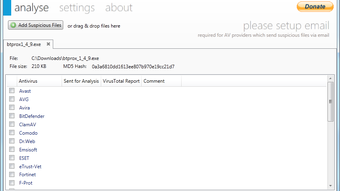
One of the standout features of X-Ray is its seamless integration with VirusTotal, one of the most trusted online malware analysis platforms. This integration allows you to scan any file using up to 31 different antivirus engines in real time. Each engine provides its verdict, and the results are displayed in a clear, color-coded table—positive detections are highlighted in red for immediate visibility. This comprehensive overview helps you quickly determine whether a file poses a threat.
Another major advantage is X-Ray’s portability. Unlike many security tools that require installation, X-Ray runs directly from a USB drive or any folder on your system. This makes it perfect for use on public or shared computers without leaving traces. It’s also automatically updated, ensuring you always have the latest version with improved detection algorithms and security patches. No manual updates are required—just launch the app, and it checks for new versions in the background.
X-Ray also includes a built-in history function that logs all submitted files and their scan results. This is incredibly useful for tracking recurring threats or analyzing patterns in suspicious behavior. Whether you’re investigating a phishing email attachment or a strange executable, the history feature helps maintain a record for future reference. Additionally, X-Ray supports both web-based and email submission methods, offering flexibility depending on your security preferences and network restrictions. For added security, some submissions may require a CAPTCHA to prevent abuse and ensure legitimate use.
How to Install and Use X-Ray for Maximum Security
Installing X-Ray is incredibly simple—there’s no traditional installation process. To get started, download the latest version from the official website. The file is typically a ZIP archive containing the executable and supporting files. Extract the contents to a folder of your choice, such as your desktop or a dedicated security folder. Once extracted, simply double-click the X-Ray executable to launch the application.
Upon opening, you’ll be greeted with a clean, minimal interface. To begin scanning a file, click the “Browse” button and select the suspicious file you want to analyze—this could be an executable, a script, a PDF with embedded code, or any file type that raises suspicion. Once selected, X-Ray will automatically send the file to VirusTotal for scanning. You’ll see a progress bar indicating the status, and within seconds, results from up to 31 antivirus engines will appear.
Each antivirus engine’s name, status, and detection details are listed in a table. Files flagged as malicious are marked in red, while clean results appear in green or gray. You can also view detailed reports, including the file’s hash, size, and upload timestamp. For advanced users, the history tab allows you to review past submissions and compare results over time. To submit a file via email, you can configure your email settings within the app, which is useful in environments where direct web access is restricted.
For optimal performance, ensure your internet connection is stable during submission. While X-Ray is designed to be lightweight, large files may take longer to upload. Always verify the file’s source before submitting—never upload sensitive or confidential data unless you’re certain it’s safe.
Compatibility and System Requirements
X-Ray is designed to be highly compatible across modern operating systems. It supports Windows 7 and later, including Windows 10 and Windows 11, making it accessible to the vast majority of desktop users. For Mac users, X-Ray is fully compatible with macOS 10.14 (Mojave) and newer, including Apple Silicon (M1/M2) Macs, ensuring smooth performance on both Intel and newer Apple hardware.
Although X-Ray is primarily a desktop application, it’s also compatible with Android and iOS devices when used through a compatible file manager or cloud-based workflow. However, direct scanning from mobile devices is limited due to file access restrictions. For best results, use X-Ray on a desktop or laptop system where you have full control over file management.
The software has minimal system requirements—no special hardware or high-end specs are needed. It runs efficiently on systems with 2GB of RAM and a standard processor. As a portable app, it doesn’t require admin rights, making it ideal for use in corporate environments with strict software policies. Because it’s free and open to all users, X-Ray is accessible to students, home users, and IT professionals alike.
One of the biggest advantages of X-Ray’s compatibility is its ability to work across different network environments. Whether you’re behind a firewall, using a proxy, or on a public Wi-Fi network, X-Ray can still connect to VirusTotal. It uses standard HTTPS protocols, ensuring secure communication and protecting your data during transmission.
Pros and Cons of Using X-Ray
- Pros:
- Free and open-source security tool with no hidden costs
- Portable—no installation required, runs from USB or any folder
- Scans files using up to 31 antivirus engines via VirusTotal
- Automatic updates keep the software secure and up to date
- Intuitive interface suitable for beginners and experts
- History function for tracking past submissions and results
- Contributes to global threat intelligence by submitting samples
- Secure transmission via HTTPS and CAPTCHA protection
- Cons:
- Large files may take longer to upload and analyze
- Some features (like email submission) require configuration
- Relies on external services (VirusTotal) for scanning
- Not available as a native mobile app (only desktop-compatible)
- Requires internet connection for all scanning functions
Frequently Asked Questions (FAQ)
- Is X-Ray safe to use?
Yes. X-Ray is a trusted, open-source tool that only sends files to VirusTotal for analysis. It does not store or distribute your files. All data is transmitted securely via HTTPS, and submissions are processed anonymously unless you choose to include personal info.
- Can I use X-Ray on Mac and Windows?
Absolutely. X-Ray is fully compatible with Windows 7 and later, as well as macOS 10.14 and newer, including Apple Silicon Macs. It’s designed to work across both platforms seamlessly.
- Does X-Ray require an internet connection?
Yes. Since X-Ray relies on VirusTotal for scanning, an active internet connection is required. It cannot perform offline analysis.
- How does X-Ray help improve global cybersecurity?
By submitting suspicious files, you help security researchers detect new malware strains faster. This collective intelligence strengthens the global defense network and improves detection rates across all antivirus engines.
- Can I submit files anonymously?
Yes. X-Ray allows anonymous submissions. Your personal information is not collected unless you explicitly provide it during email submission. The system respects user privacy and data protection.
- Is there a mobile version of X-Ray?
Not currently. X-Ray is designed for desktop use. However, you can transfer files to a computer and analyze them using X-Ray on your mobile device.
Conclusion: Why You Should Download X-Ray Today
With cyber threats evolving at an unprecedented pace, having a reliable, free, and easy-to-use tool like X-Ray is more important than ever. Whether you’re a home user concerned about phishing emails or an IT professional managing endpoint security, X-Ray offers a powerful way to analyze suspicious files instantly. Its integration with VirusTotal ensures that your files are scanned by leading antivirus engines, giving you confidence in the results.
Best of all, X-Ray is completely free, portable, and updates automatically—no hassle, no cost. By using it, you’re not just protecting your own system; you’re contributing to a global effort to combat malware. Every file you submit helps improve detection rates for millions of users worldwide.
Don’t wait until a virus strikes. Download X-Ray now and take control of your digital security. It’s fast, secure, and simple—perfect for users of all skill levels. Start protecting your devices and the internet community today.
Download X-Ray today and make your system safer—free, secure, and always updated.
Guides & Tutorials
How to install Ray
- Click the Download button above.
- Once redirected, accept the terms and click Install.
- Wait for the Ray download to finish on your device.
How to use Ray
This software is primarily used for its core features described above. Open the app after installation to explore its capabilities.
User Reviews
No reviews yet. Be the first to share your experience.
You may also like
more
Llama 2
Free-to-use large language model As the new addition to Meta’s arsenal of langua...

NotebookLM
Revolutionizing the note-taking and idea-generation process NotebookLM is an exp...

Github co pilot
AI-inspired software development and coding platform GitHub Copilot is a browser...

Google Gemma
Google’s lightweight AI models Introducing Google Gemma , a family of cutting-ed...

AI Image Enlarger
A free app for Windows, by ai-image-larger. AI Image Enlarger is a free software...

DALL E
AI-driven text-to-image transformation engine DALL·E is a free graphic and desig...